


Overview
MODEL – Hydro Sensor
SENSORS – pH, EC/TDS
COMPATIBLE CONTROLLERS – CONTROLLER AI+
INCLUDED SOLUTIONS – pH 4.0, pH 7.0, pH 10.01 Calibration Buffer Solutions, EC 84.0 μS/cm, EC 1413 μS/cm, EC 12.88 mS/cm Conductivity Calibration Solutions
The AC Infinity app is needed to calibrate the Hydro Sensor. Download the app and setup your devices before proceeding. Click here for app setup instructions.
Solution Setup
Read all instructions before actively setting up your calibration station.
Prepare separate cups of distilled water for each solution you will be using. You will be using these to rinse your probes after each calibration. DO NOT use the same cup for rinsing, as this may lead to cross-contamination.
Calibrating the pH Sensor
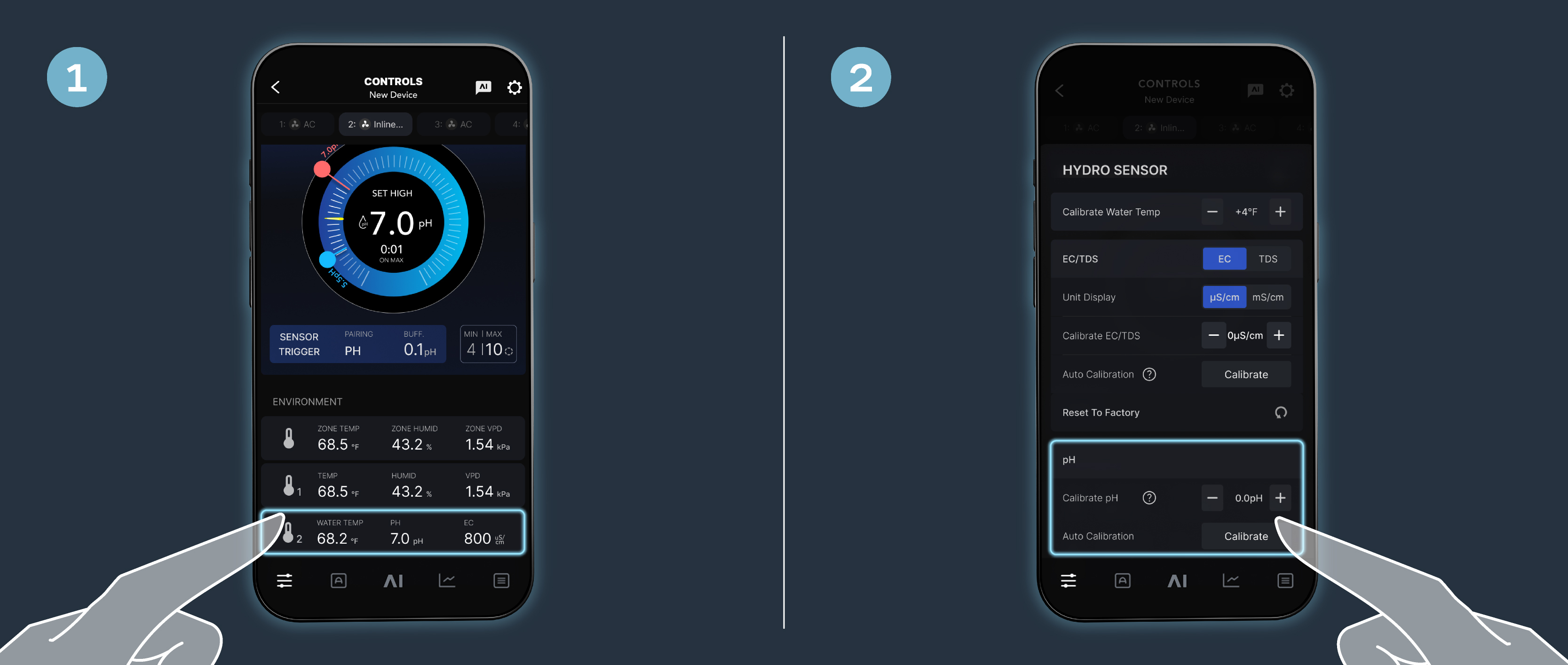
STEP 1
Select the Hydro Sensor on your device page.
STEP 2
You may manually adjust your pH calibration, or you can select “Auto Calibration” for more precise measurements. Adhere to the following steps for Auto Calibration.
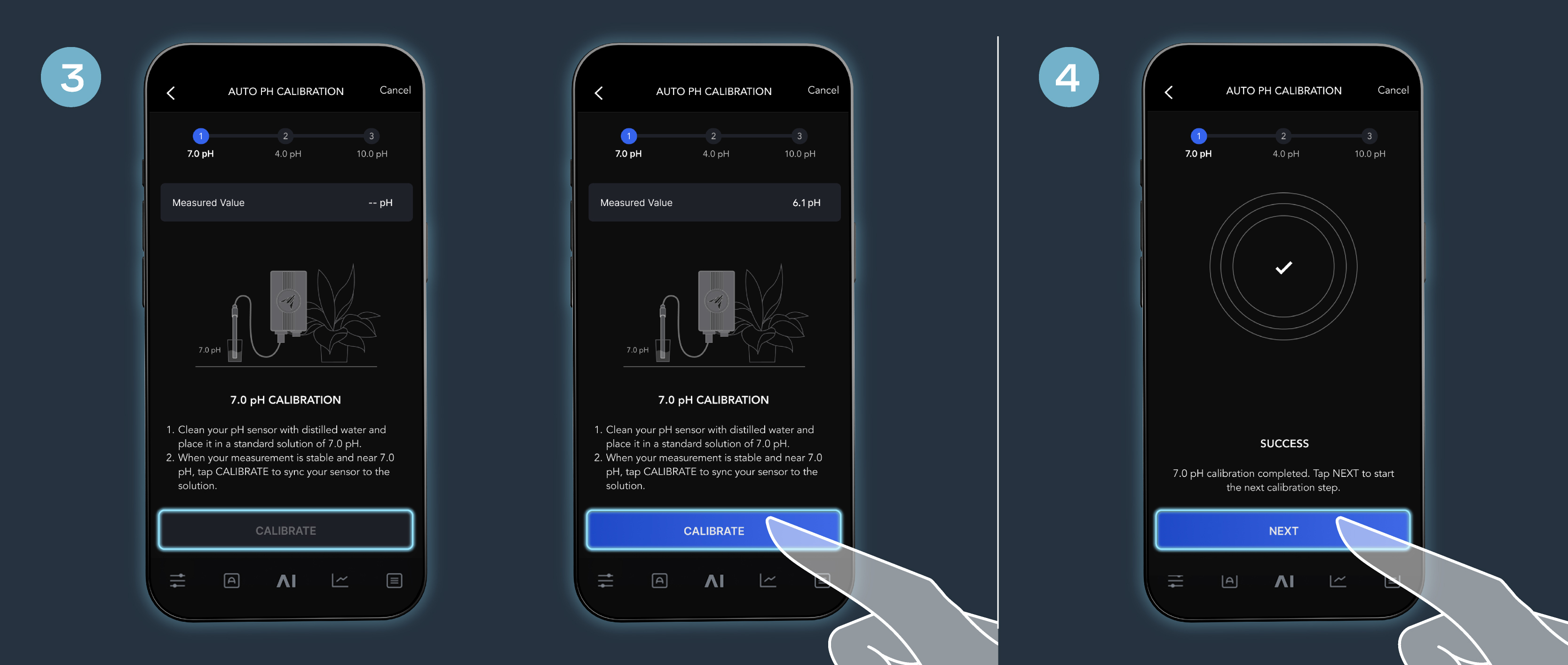
STEP 3
Rinse your pH sensor with distilled water and place it in the pH 7.0 solution.
When your measurement stabilizes, the “CALIBRATE” button will illuminate on your screen. Tap “CALIBRATE’ to sync your sensor to the solution.
Calibration may take a few minutes to complete. All pH-related modes will be paused until calibration is finished.
STEP 4
Once the calibration is successful, tap “NEXT” to proceed to the next calibration step.
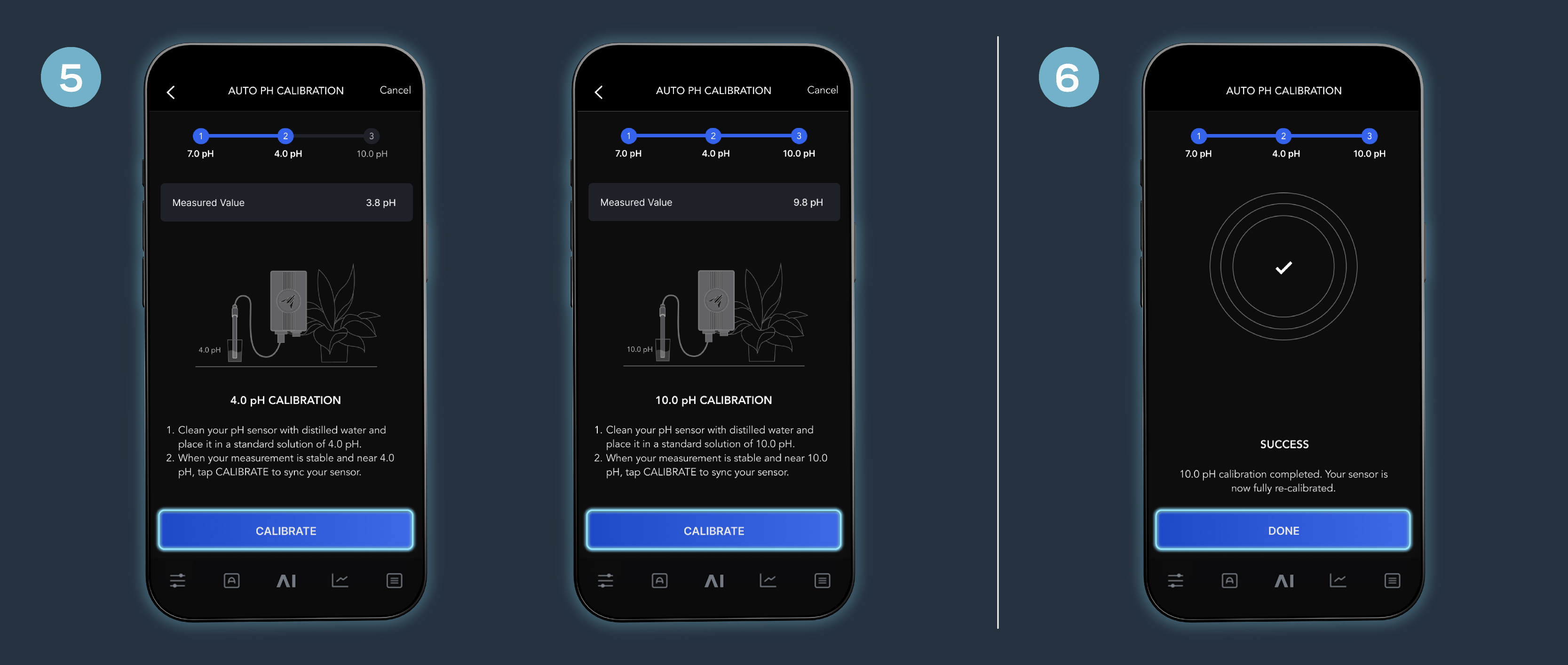
STEP 5
Repeat steps 3 and 4 for the pH 4.0 and pH 10.01 solutions.
You may exit the calibration process at any time by pressing “CANCEL” at the top tight corner of your screen. Whenever you return to calibrate the sensor, you will pick up where you’ve left off.
STEP 6
Once your sensor is fully re-calibrated, select “DONE” to be navigated back to the Hydro Sensor settings page. You may now place your pH sensor into your testing solution.
How Often to Calibrate
The frequency that you need to calibrate your meter depends on the tested samples, electrode conditions, and the accuracy requirement. For High-Accuracy measurements (≤ ±0.02pH), the meter should be calibrated before every test. For ordinary-accuracy measurements (≥ ±0.1pH), once calibrated, the meter can be used for about a week or longer. In the following cases, the meter must be re-calibrated:
- The electrode hasn’t been used for a long time, or a new electrode is connected.
- After measuring strong acid (pH<2) or strong base (pH>12) solutions.
- After measuring strong organic solutions or solutions containing fluoride.
- There is a significant temperature difference between the test sample and the buffer solution.
Calibrating the EC/TDS Sensor
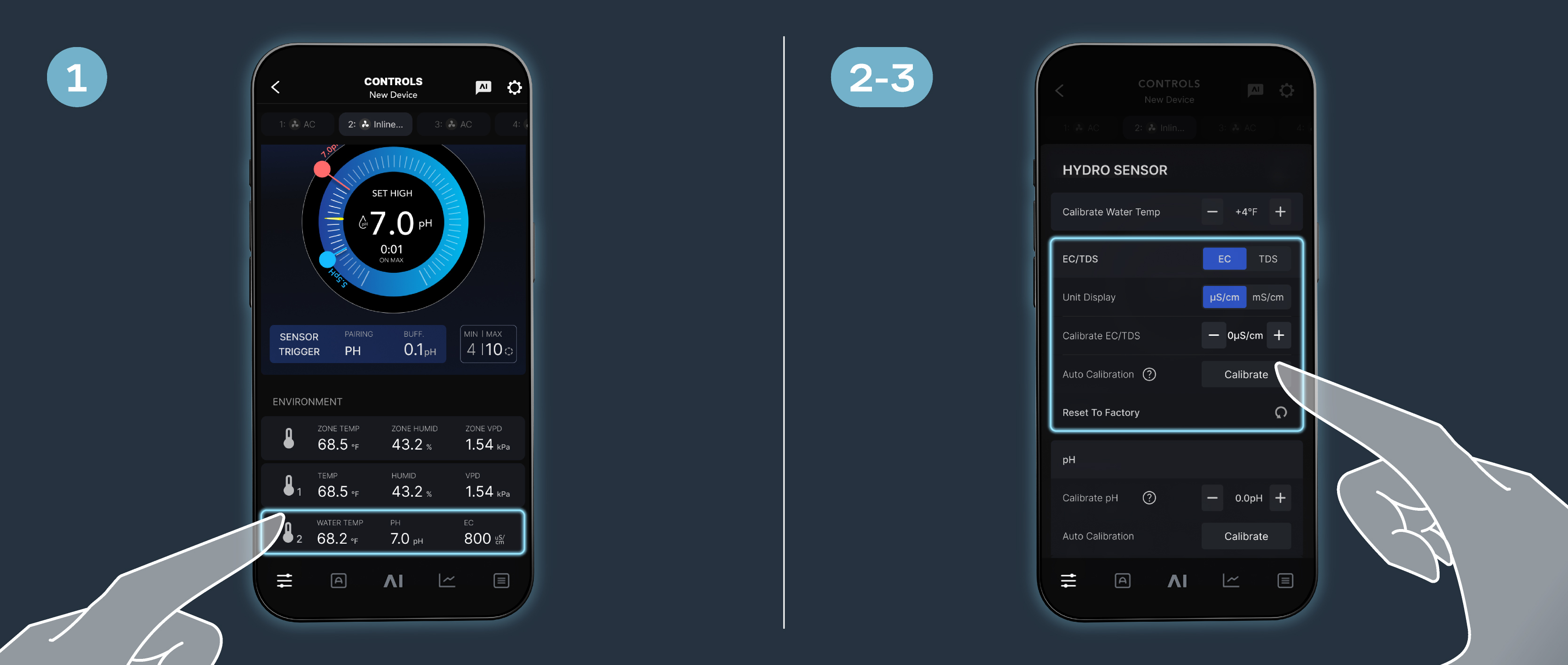
STEP 1
Select the Hydro Sensor on your device page.
STEP 2
Select whether you wish to calibrate “EC” or “TDS” and in which unit of measurement (“μS/cm” or “mS/cm”).
STEP 3
You may manually adjust your EC or TDS calibrations individually, or you can select “Auto Calibration” to calibrate EC and TDS simultaneously. Adhere to the following steps for Auto Calibration.
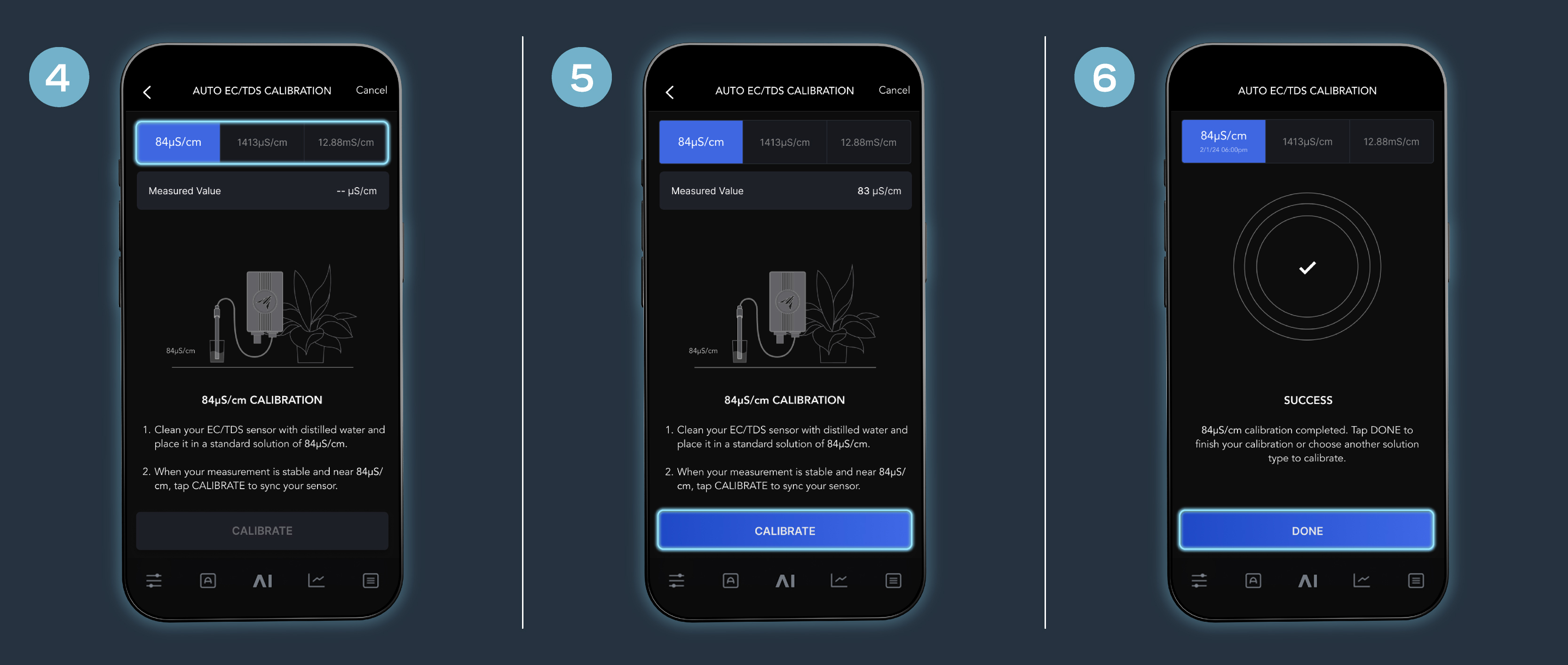
STEP 4
Select which calibration solution you will be using at the top of the screen.
STEP 5
Rinse your EC/TDS sensor with distilled water and place it in your chosen calibration solution.
When your measurement stabilizes, the “CALIBRATE” button will illuminate on your screen. Tap “CALIBRATE’ to sync your sensor to the solution.
Calibration may take a few minutes to complete. All EC/TDS-related modes will be paused until calibration is finished.
STEP 6
Once your sensor is fully re-calibrated, select “DONE” to be navigated back to the Hydro Sensor settings page. You may now place your EC/TDS sensor into your testing solution.
How Often to Calibrate
We recommend calibrating the EC/TDS sensor once per month under normal conditions.
If the accuracy requirement is high or if there is a significant difference in temperature between the test sample and the conductivity solution, we recommend calibrating once a week.
You may see if sensor needs calibration by testing the calibration solutions. If there is a significant difference in measurements compared to the standard values, then a calibration is necessary.
For new electrodes, or for a meter that has been restored to the factory default setting, we recommend conducting a calibration.


